People of the Pines2.7.2
Publisher Description


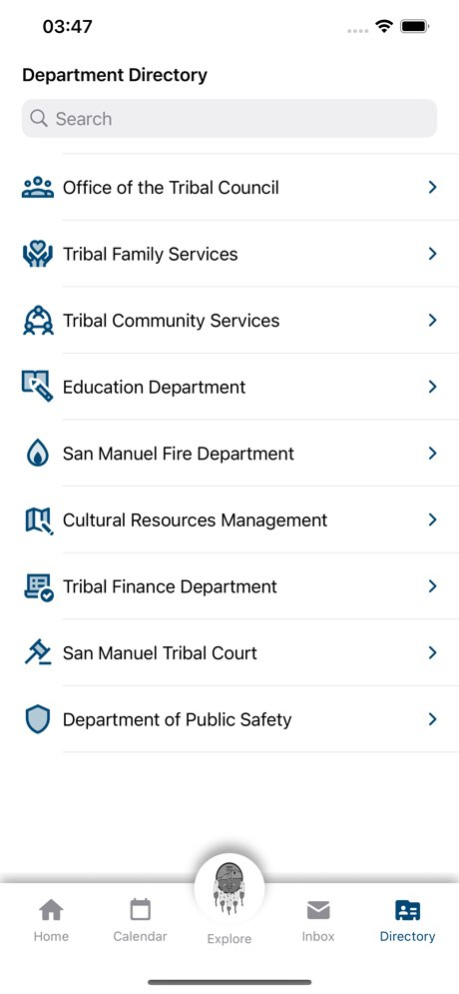
Stay up to date with the latest news and events.
Requires San Manuel Band of Mission Indians Google Account
Version History Fixes and Improvements 2.7.2 Jun 22 Minor updates to improve your experience. 2.7.1 08/22/2025 Improved visibility of News and Department back buttons.
Fixed a bug where some links appeared invisible due to white text on white backgrounds. 2.7 08/11/2025 Experience the all-new design. See what’s new. 2.6 07/31/2025 Minor fixes 2.5 11/07/2024 A new Report Suspicious Activity feature will provide app users quick and easy access to call emergency services, report suspicious activities, and view situational awareness tips to better serve and protect the community. 2.4 08/13/2024 Fixed issue with Quick Links 2.3 01/08/2024 Bug fix for some networking related issues. 2.2 08/05/2022 You can now favorite messages, learn more about opportunities and programs available, and easily access websites.
- Engagements provides fast access to resources and information about different opportunities/programs.
- Quick Links helps you access those hard to remember websites.
- Favorites allows users to save important messages for quick access.
- Badge indicators now appear indicating new content.
We've also squashed some bugs and made improvements. 2.1 06/29/2022 Application has been rewritten from the ground up
Dark Mode!
Fixed multiple crashes
Redesigned multiple screens 2.0 02/17/2021 1.0 12/18/2020
About People of the Pines
The company that develops People of the Pines is Yuhaaviatam of San Manuel Nation. The latest version released by its developer is 2.7.2.
To install People of the Pines on your iOS device, just click the green Continue To App button above to start the installation process. The app is listed on our website since 2026-10-13 and was downloaded 2 times. We have already checked if the download link is safe, however for your own protection we recommend that you scan the downloaded app with your antivirus. Your antivirus may detect the People of the Pines as malware if the download link is broken.
How to install People of the Pines on your iOS device:
- Click on the Continue To App button on our website. This will redirect you to the App Store.
- Once the People of the Pines is shown in the iTunes listing of your iOS device, you can start its download and installation. Tap on the GET button to the right of the app to start downloading it.
- If you are not logged-in the iOS appstore app, you'll be prompted for your your Apple ID and/or password.
- After People of the Pines is downloaded, you'll see an INSTALL button to the right. Tap on it to start the actual installation of the iOS app.
- Once installation is finished you can tap on the OPEN button to start it. Its icon will also be added to your device home screen.
Program Details
System requirements
Download information
Pricing
Version History
version 2.7.2
posted on 2026-10-13
Version History Fixes and Improvements 2.7.2 Jun 22 Minor updates to improve your experience. 2.7.1 08/22/2025 Improved visibility of News and Department back buttons.
Fixed a bug where some links appeared invisible due to white text on white backgrounds. 2.7 08/11/2025 Experience the all-new design. See what’s new. 2.6 07/31/2025 Minor fixes 2.5 11/07/2024 A new Report Suspicious Activity feature will provide app users quick and easy access to call emergency services, report suspicious activities, and view situational awareness tips to better serve and protect the community. 2.4 08/13/2024 Fixed issue with Quick Links 2.3 01/08/2024 Bug fix for some networking related issues. 2.2 08/05/2022 You can now favorite messages, learn more about opportunities and programs available, and easily access websites.
- Engagements provides fast access to resources and information about different opportunities/programs.
- Quick Links helps you access those hard to remember websites.
- Favorites allows users to save important messages for quick access.
- Badge indicators now appear indicating new content.
We've also squashed some bugs and made improvements. 2.1 06/29/2022 Application has been rewritten from the ground up
Dark Mode!
Fixed multiple crashes
Redesigned multiple screens 2.0 02/17/2021 1.0 12/18/2020
version 2.7.2
posted on 2026-06-29
Version History Fixes and Improvements 2.7.2 6d ago Minor updates to improve your experience. 2.7.1 08/22/2025 Improved visibility of News and Department back buttons.
Fixed a bug where some links appeared invisible due to white text on white backgrounds. 2.7 08/11/2025 Experience the all-new design. See what’s new. 2.6 07/31/2025 Minor fixes 2.5 11/07/2024 A new Report Suspicious Activity feature will provide app users quick and easy access to call emergency services, report suspicious activities, and view situational awareness tips to better serve and protect the community. 2.4 08/13/2024 Fixed issue with Quick Links 2.3 01/08/2024 Bug fix for some networking related issues. 2.2 08/05/2022 You can now favorite messages, learn more about opportunities and programs available, and easily access websites.
- Engagements provides fast access to resources and information about different opportunities/programs.
- Quick Links helps you access those hard to remember websites.
- Favorites allows users to save important messages for quick access.
- Badge indicators now appear indicating new content.
We've also squashed some bugs and made improvements. 2.1 06/29/2022 Application has been rewritten from the ground up
Dark Mode!
Fixed multiple crashes
Redesigned multiple screens 2.0 02/17/2021 1.0 12/18/2020
version 2.7.1
posted on 2026-06-02
Version History Minor updates to improve your experience. 2.7.1 08/22/2025 Improved visibility of News and Department back buttons.
Fixed a bug where some links appeared invisible due to white text on white backgrounds. 2.7 08/11/2025 Experience the all-new design. See what’s new. 2.6 07/31/2025 Minor fixes 2.5 11/07/2024 A new Report Suspicious Activity feature will provide app users quick and easy access to call emergency services, report suspicious activities, and view situational awareness tips to better serve and protect the community. 2.4 08/13/2024 Fixed issue with Quick Links 2.3 01/08/2024 Bug fix for some networking related issues. 2.2 08/05/2022 You can now favorite messages, learn more about opportunities and programs available, and easily access websites.
- Engagements provides fast access to resources and information about different opportunities/programs.
- Quick Links helps you access those hard to remember websites.
- Favorites allows users to save important messages for quick access.
- Badge indicators now appear indicating new content.
We've also squashed some bugs and made improvements. 2.1 06/29/2022 Application has been rewritten from the ground up
Dark Mode!
Fixed multiple crashes
Redesigned multiple screens 2.0 02/17/2021 1.0 12/18/2020
version 2.7.1
posted on 2025-08-22
Aug 22, 2025
Version 2.7.1
Minor updates to improve your experience.
version 2.7.1
posted on 2025-08-22
Minor updates to improve your experience.
version 2.5
posted on 2024-11-07
Nov 7, 2024
Version 2.5
Minor fixes
version 2.4
posted on 2024-08-13
Aug 13, 2024
Version 2.4
A new Report Suspicious Activity feature will provide app users quick and easy access to call emergency services, report suspicious activities, and view situational awareness tips to better serve and protect the community.
version 2.3
posted on 2024-01-08
Jan 8, 2024
Version 2.3
Fixed issue with Quick Links
version 2.2
posted on 2022-08-05
Aug 5, 2022
Version 2.2
Bug fix for some networking related issues.
